Catered to your Business.

Streamline your restaurant and catering operations with our comprehensive business management solution, tailored to your needs.
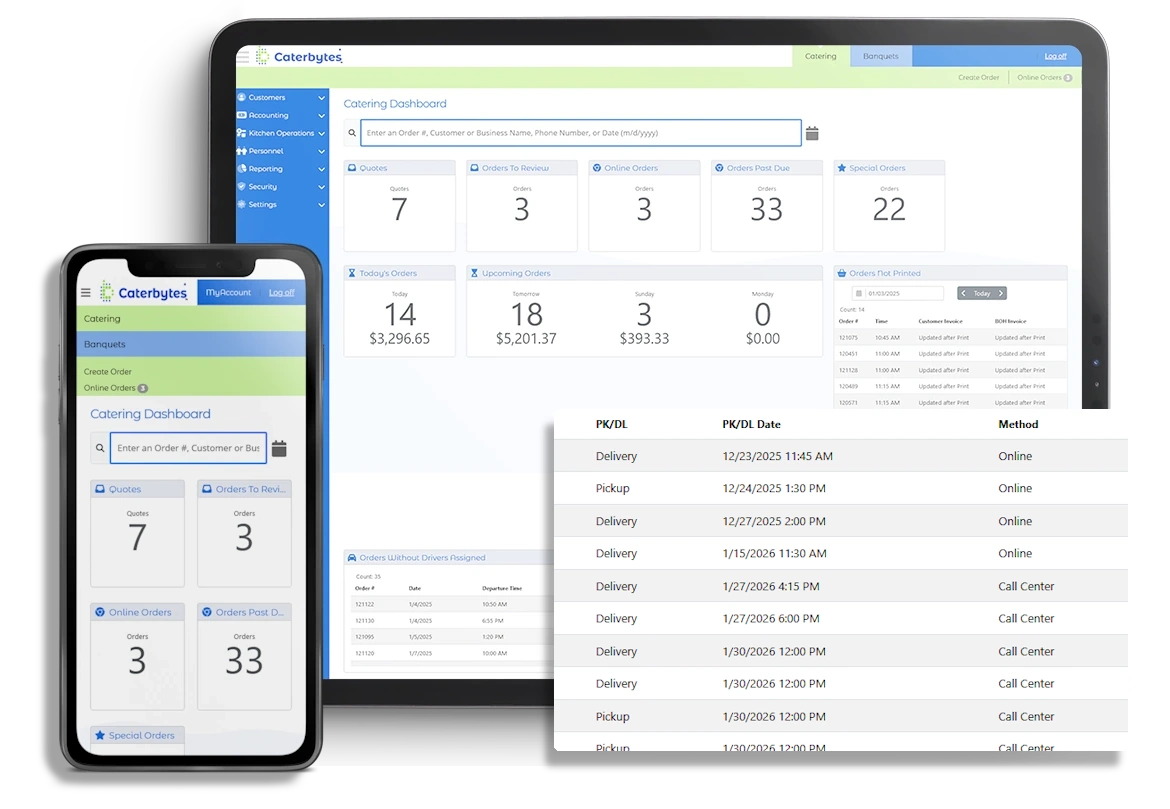
Caterbytes web application shown on an iPad and an iphone

Watch how Caterbytes delivers peak efficiency and profitability.

Features that drive profitability, improve efficiency, and enhance customer experience.

Online Ordering
Menu Management
Payment Processing
Customer Management
Delivery Management
Staff Management
Kitchen Operations
Orders & Invoicing
Operational Management
Financials

Online Ordering

A desktop computer setup displays an online food ordering website. The screen shows a "Categories" page with a grid of high-quality food images and labels such as Antipasti, Beverages, and Desserts, set against a clean white interface with a dark wood header.

Effortless & Branded: Seamlessly integrate online ordering into your website with a fully branded experience. 24/7 availability and mobile-friendly design ensure customers can order anytime, anywhere.

Menu Management
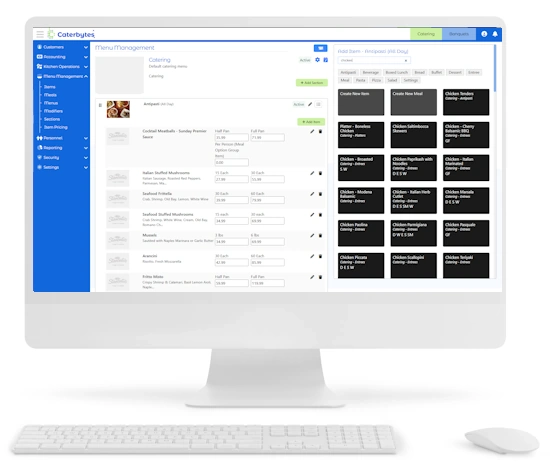
A white desktop computer and keyboard display the Caterbytes "Menu Management" dashboard. The screen shows a detailed administrative interface with a blue sidebar on the left and a central workspace featuring a list of catering items like Cocktail Meatballs and Italian Stuffed Mushrooms with editable pricing fields. On the right, a grid of black tiles represents individual menu items for quick selection and editing.

Dynamic & Flexible: Easily manage menu availability, create seasonal specialties, and offer customized menus for specific clients. Control pricing, accommodate dietary restrictions, and bundle items for convenient ordering.

Payment Processing

A digital screenshot of the Caterbytes "Credit Card Payments" dashboard displayed on a white computer monitor. The interface features a blue navigation sidebar on the left and a central table listing customer transactions with columns for Order Total, Open Balance, and Amount. Blue "Capture Payment" buttons are aligned to the right of each entry, and a summary section at the bottom breaks down totals by category, such as Food, Delivery, and Tax.

Secure & Streamlined: Integrate with Stripe for secure and efficient payment processing. Manage credit card fees, track house accounting, and offer flexible payment options to your customers.

Customer Management

A digital screenshot of a desktop monitor displays the Caterbytes customer management interface. The screen shows a comprehensive profile form for a customer named Mike at Portage Lake Cabins, including fields for street address, phone number, and email. A blue navigation sidebar on the left organizes administrative tools, while a "Payment Methods" section at the bottom allows for the management of saved credit cards.

Personalized Experience: Create personalized accounts for both business and individual customers. Store customer information, track order history, and easily export customer email lists for targeted marketing.

Delivery Management
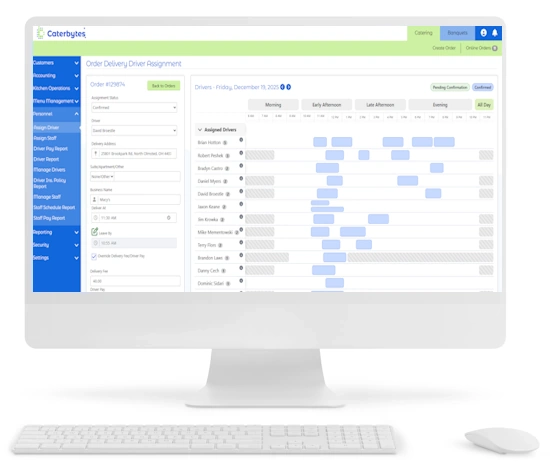
A desktop computer displaying the Caterbytes Order Delivery Driver Assignment interface, which features a detailed scheduling timeline for various drivers alongside a form for assigning a specific driver to an order.

Efficient & Organized: Assign, manage, and pay drivers with ease. Schedule deliveries, track driver availability, and optimize delivery routes for maximum efficiency.

Staff Management
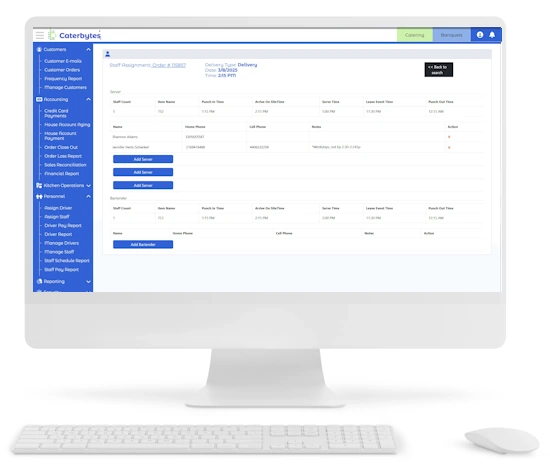
A digital screenshot of a white desktop monitor displays the Caterbytes staff management interface. The screen shows a Staff Assignment table for Order #115857, organized into sections for Server and Bartender roles. The table includes columns for punch-in times, arrival times, and leave event times, with blue buttons to "Add Server" or "Add Bartender." A blue navigation sidebar is visible on the left, and a white keyboard and mouse sit in the foreground.

Streamlined Scheduling: Manage staff availability, assign them to events, and streamline payroll processes.

Kitchen Operations
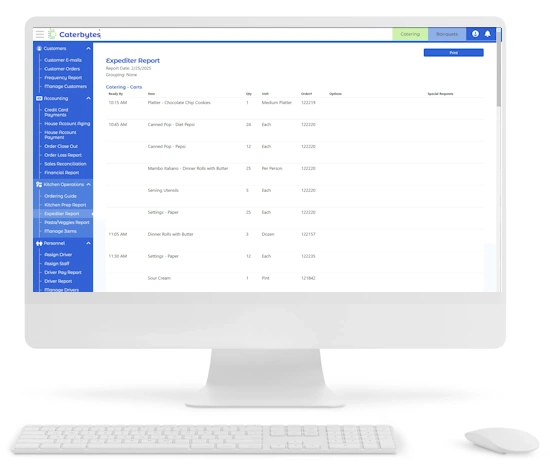
A digital screenshot of a white desktop monitor displays the Caterbytes "Expediter Report" for kitchen operations. The screen shows a detailed log of catering items to be prepared, including Chocolate Chip Cookies, Diet Pepsi, and Dinner Rolls with Butter, organized by "Ready By" times ranging from 10:15 AM to 11:30 AM. A blue navigation sidebar on the left highlights kitchen-specific tools such as Ordering Guide and Kitchen Prep Report, and a white keyboard and mouse sit in the foreground.

Organized Workflow: Improve kitchen efficiency with cook and prep station reports, expediter reports, and intelligent inventory forecasting.

Orders & Invoicing
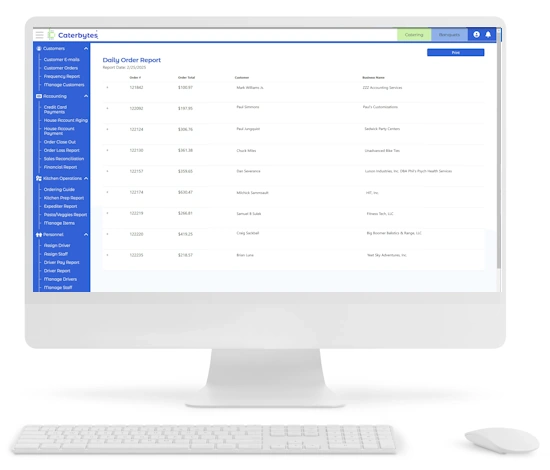
A digital screenshot of a desktop monitor displays the Caterbytes "Daily Order Report" for February 25, 2025. The interface features a blue navigation sidebar on the left and a central table listing orders by number, total cost, customer name, and business. Examples include Order #121842 for $100.97 and Order #122174 for $630.47. A white keyboard and mouse are visible in the foreground.

Centralized & Automated: Centralize order management, generate quotes, and easily create and manage invoices.

Operational Management
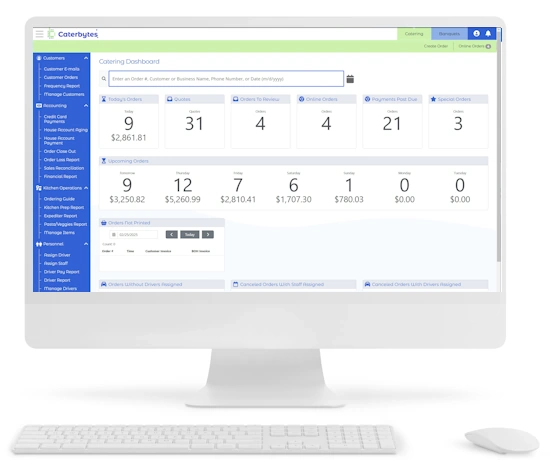
A digital screenshot of a desktop monitor displays the Caterbytes "Catering Dashboard." The interface features a blue navigation sidebar on the left and a central workspace with summary tiles for operational metrics, including Today's Orders (9 totaling $2,861.81), Quotes (31), and Payments Post Due (21). A section for Upcoming Orders provides a daily forecast of order counts and revenue for the week, while a white keyboard and mouse sit in the foreground.

Your Business at a Glance: Get a real-time pulse on your performance. Our intelligent dashboards distill complex financial data into a single, actionable snapshot of your orders and revenue.

Financials
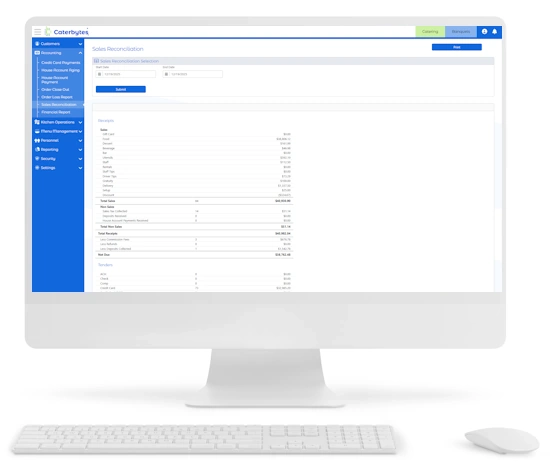
A desktop computer displaying a catering software's Sales Reconciliation dashboard, featuring a detailed financial report with itemized sales categories, receipt totals, and a sidebar navigation menu.

Full Financial Oversight: Master your cash flow with a unified view of your debits, credits, and accounts receivable. Our financial snapshot simplifies complex sales and credit card reconciliations, giving you total control over your bottom line.

Online Ordering

A desktop computer setup displays an online food ordering website. The screen shows a "Categories" page with a grid of high-quality food images and labels such as Antipasti, Beverages, and Desserts, set against a clean white interface with a dark wood header.

Effortless & Branded: Seamlessly integrate online ordering into your website with a fully branded experience. 24/7 availability and mobile-friendly design ensure customers can order anytime, anywhere.

Menu Management

A white desktop computer and keyboard display the Caterbytes "Menu Management" dashboard. The screen shows a detailed administrative interface with a blue sidebar on the left and a central workspace featuring a list of catering items like Cocktail Meatballs and Italian Stuffed Mushrooms with editable pricing fields. On the right, a grid of black tiles represents individual menu items for quick selection and editing.

Dynamic & Flexible: Easily manage menu availability, create seasonal specialties, and offer customized menus for specific clients. Control pricing, accommodate dietary restrictions, and bundle items for convenient ordering.

Payment Processing

A digital screenshot of the Caterbytes "Credit Card Payments" dashboard displayed on a white computer monitor. The interface features a blue navigation sidebar on the left and a central table listing customer transactions with columns for Order Total, Open Balance, and Amount. Blue "Capture Payment" buttons are aligned to the right of each entry, and a summary section at the bottom breaks down totals by category, such as Food, Delivery, and Tax.

Secure & Streamlined: Integrate with Stripe for secure and efficient payment processing. Manage credit card fees, track house accounting, and offer flexible payment options to your customers.

Customer Management

A digital screenshot of a desktop monitor displays the Caterbytes customer management interface. The screen shows a comprehensive profile form for a customer named Mike at Portage Lake Cabins, including fields for street address, phone number, and email. A blue navigation sidebar on the left organizes administrative tools, while a "Payment Methods" section at the bottom allows for the management of saved credit cards.

Personalized Experience: Create personalized accounts for both business and individual customers. Store customer information, track order history, and easily export customer email lists for targeted marketing.

Delivery Management

A desktop computer displaying the Caterbytes Order Delivery Driver Assignment interface, which features a detailed scheduling timeline for various drivers alongside a form for assigning a specific driver to an order.

Efficient & Organized: Assign, manage, and pay drivers with ease. Schedule deliveries, track driver availability, and optimize delivery routes for maximum efficiency.

Staff Management

A digital screenshot of a white desktop monitor displays the Caterbytes staff management interface. The screen shows a Staff Assignment table for Order #115857, organized into sections for Server and Bartender roles. The table includes columns for punch-in times, arrival times, and leave event times, with blue buttons to "Add Server" or "Add Bartender." A blue navigation sidebar is visible on the left, and a white keyboard and mouse sit in the foreground.

Streamlined Scheduling: Manage staff availability, assign them to events, and streamline payroll processes.

Kitchen Operations

A digital screenshot of a white desktop monitor displays the Caterbytes "Expediter Report" for kitchen operations. The screen shows a detailed log of catering items to be prepared, including Chocolate Chip Cookies, Diet Pepsi, and Dinner Rolls with Butter, organized by "Ready By" times ranging from 10:15 AM to 11:30 AM. A blue navigation sidebar on the left highlights kitchen-specific tools such as Ordering Guide and Kitchen Prep Report, and a white keyboard and mouse sit in the foreground.

Organized Workflow: Improve kitchen efficiency with cook and prep station reports, expediter reports, and intelligent inventory forecasting.

Orders & Invoicing

A digital screenshot of a desktop monitor displays the Caterbytes "Daily Order Report" for February 25, 2025. The interface features a blue navigation sidebar on the left and a central table listing orders by number, total cost, customer name, and business. Examples include Order #121842 for $100.97 and Order #122174 for $630.47. A white keyboard and mouse are visible in the foreground.

Centralized & Automated: Centralize order management, generate quotes, and easily create and manage invoices.

Operational Management

A digital screenshot of a desktop monitor displays the Caterbytes "Catering Dashboard." The interface features a blue navigation sidebar on the left and a central workspace with summary tiles for operational metrics, including Today's Orders (9 totaling $2,861.81), Quotes (31), and Payments Post Due (21). A section for Upcoming Orders provides a daily forecast of order counts and revenue for the week, while a white keyboard and mouse sit in the foreground.

Your Business at a Glance: Get a real-time pulse on your performance. Our intelligent dashboards distill complex financial data into a single, actionable snapshot of your orders and revenue.

Financials

A desktop computer displaying a catering software's Sales Reconciliation dashboard, featuring a detailed financial report with itemized sales categories, receipt totals, and a sidebar navigation menu.

Full Financial Oversight: Master your cash flow with a unified view of your debits, credits, and accounts receivable. Our financial snapshot simplifies complex sales and credit card reconciliations, giving you total control over your bottom line.

How Caterbytes Works For You.

cost savings icon with a dollar sign in a circle with a checkmark

Cost Savings

Work smarter with less staff and reduced waste while improving employee engagement and generating greater customer satisfaction with minimal additional effort.

improved efficiency icon with an arrowed circle surrounding three upward arrows

Operational Efficiency

Streamline and coordinate all of your business processes, data and information into one integrated platform, allowing for more efficient operations and collaboration across departments.

increased revenue icon with a hand supporting an upward trending chart and a dollar sign in a circle

Increased Revenue

When your operations work like a well-oiled machine and customer expectations are met or even exceeded, repeat and referral revenue are sure to come with it.

improved customer experience icon with the silhouettes of three people with positive review icons above them

Enhanced Customer Experience

Customers have a growing expectation of having everything at their fingertips, whether on their phone or computer, and Caterbytes makes this possible through an intuitive customer interface.

24/7 ordering icon with a desktop computer displaying a clock and a prep station

24/7 Ordering

Customer self-service and online ordering enables you to meet your customers where they are at all times of the day or night without the need to have staff manning the phones.

improved staffing icon with a figure pointing at three checkboxes in square shapes

Labor Efficiency

Reduce labor costs and increase employee satisfaction by automating time-consuming tasks. Our software streamlines your operations with automated workflows and task management.

A platform designed to optimize your hospitality business.

Caterers

Optimize efficiency through a centralized hub for interacting with clients, ensuring smooth collaboration and rapid responses to questions. Further functionalities encompass tailored menus, online ordering, and delivery management. 

Restaurants

Offers a customer-centric platform allowing effortless menu exploration, personalized ordering, and secure transaction processing.  Manage capacity, staff planning and food preparation all in one seamless system. 

Event Centers

Provide event organizers with a comprehensive platform to handle all aspects of catering, simplifying the planning process. Manage multiple events simultaneously, reducing administrative burdens and maximizing productivity. 

Hotels

Provide guests with a user-friendly interface to browse menus, place orders, and request customizations, all from their smartphones. Streamline the internal processes, allowing hotel staff to efficiently manage kitchen operations, and coordinate with the catering team. 

Food Trucks

Enable patrons to peruse menus, and initiate orders for pickup or delivery from their home or via smartphone. Efficiently plan for each event and eliminate waste with capacity planning through detailed reporting.  

Need Seamless Control? Contact Us for Streamlined Operations.